Media & files
Send photos, videos, audio, and documents on WhatsApp, and receive the files customers send you
Send files by public HTTPS URL in attachments, with optional text. Files customers send you arrive on your webhook with a stable Blooio URL you can download without credentials.
Send a file
cURL
curl -X POST 'https://api.blooio.com/v4/messages' \
  -H 'Authorization: Bearer YOUR_API_KEY' \
  -H 'Content-Type: application/json' \
  -d '{
    "to": "+15551234567",
    "from": "+15559876543",
    "text": "Your receipt is attached.",
    "attachments": [
      { "url": "https://example.com/receipt.pdf", "fileName": "Receipt-A1234.pdf" }
    ]
}'Node.js
await fetch('https://api.blooio.com/v4/messages', {
  method: 'POST',
  headers: {
    'Authorization': `Bearer ${process.env.BLOOIO_API_KEY}`,
    'Content-Type': 'application/json'
  },
  body: JSON.stringify({
    to: '+15551234567',
    from: '+15559876543',
    text: 'Your receipt is attached.',
    attachments: [
      { url: 'https://example.com/receipt.pdf', fileName: 'Receipt-A1234.pdf' }
    ]
  })
})
Python
requests.post('https://api.blooio.com/v4/messages',
  headers={
    'Authorization': f"Bearer {os.environ['BLOOIO_API_KEY']}",
    'Content-Type': 'application/json'
  },
  json={
    'to': '+15551234567',
    'from': '+15559876543',
    'text': 'Your receipt is attached.',
    'attachments': [
      { 'url': 'https://example.com/receipt.pdf', 'fileName': 'Receipt-A1234.pdf' }
    ]
  }
)
Each attachment is a URL string, or an object with url and an optional fileName. Meta downloads the file from your URL when it sends the message, so the URL must be publicly reachable over HTTPS and stay up until the message is delivered.
How the file type is chosen
Blooio picks the WhatsApp media type from the extension of fileName when set, otherwise of the URL:
| Extension | Sent as | The customer sees |
|---|---|---|
jpg, jpeg, png, webp |
image |
The photo inline |
mp4, 3gp |
video |
An inline video player |
aac, amr, mp3, m4a, ogg, opus |
audio |
An audio player |
| anything else, or no extension | document |
A file card with the name, size, and type |
A document shows fileName as its name in the chat; without one, WhatsApp shows the name from the URL. For a URL with no extension (a signed or CDN link), set fileName with the right extension to have it sent as a photo, video, or audio file instead of a document.
Several files, and text
WhatsApp carries one file per message, and only photos, videos, and documents can carry a caption. You can still send any number of attachments with text in one request. Blooio sends them as consecutive WhatsApp messages, in order, under the one Blooio message the request returns:
textbecomes the caption on the first file when it's a photo, video, or document.- When the first file is audio,
textgoes out first as its own message, then the audio.
{
  "to": "+15551234567",
  "from": "+15559876543",
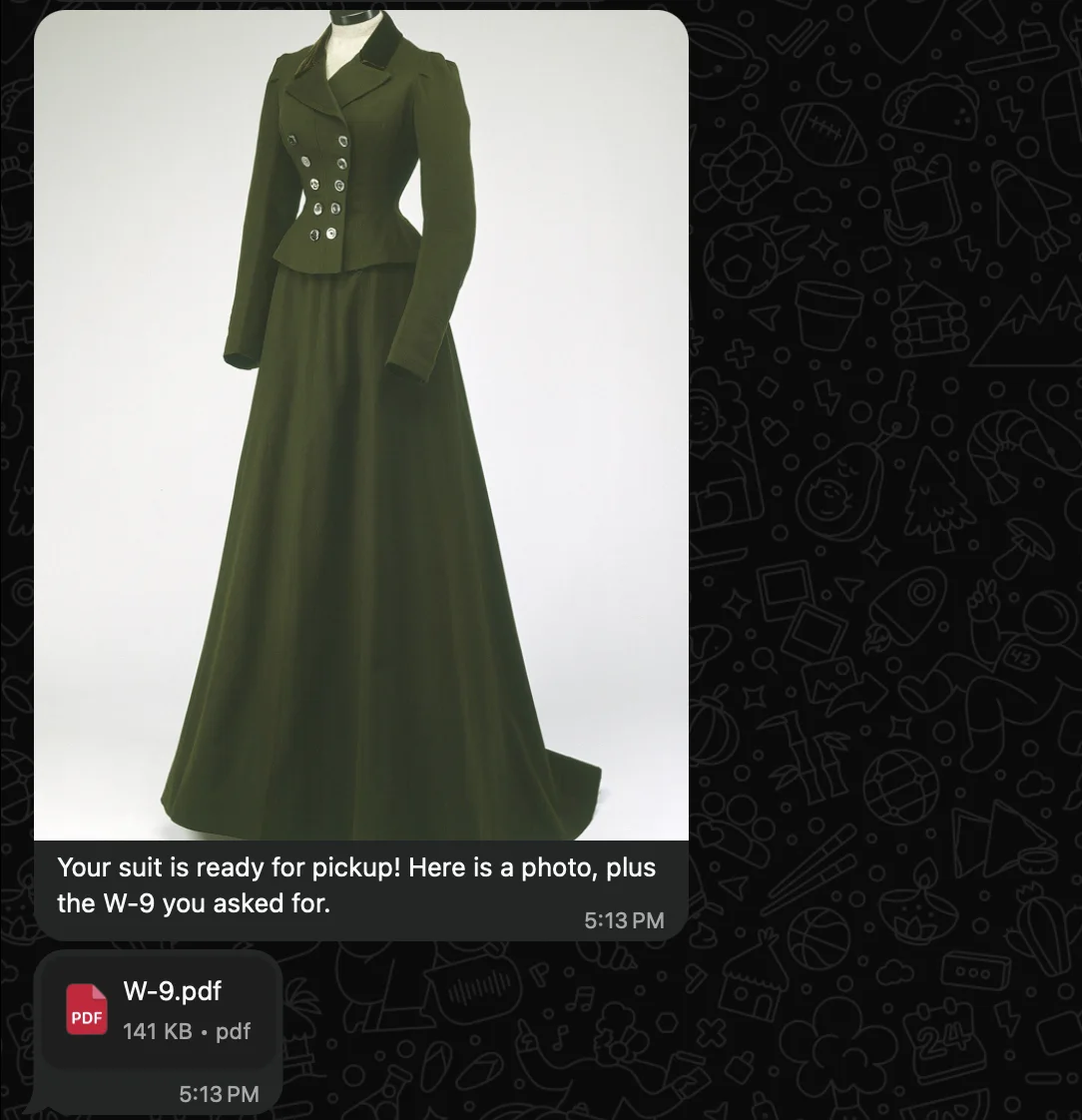
  "text": "Your suit is ready for pickup! Here is a photo, plus the W-9 you asked for.",
  "attachments": [
    "https://example.com/suit.jpg",
    { "url": "https://example.com/fw9.pdf", "fileName": "W-9.pdf" }
  ]
}
That request reaches the customer as a captioned photo followed by the PDF:
With audio first, the text arrives on its own, then the audio player:
{
  "to": "+15551234567",
  "from": "+15559876543",
  "text": "Ana recorded a quick note about your alterations:",
  "attachments": ["https://example.com/note-from-ana.mp3"]
}
Status webhooks from every one of those WhatsApp messages move the single Blooio message's status, so it reads delivered or read once the customer has them. If Meta refuses one, the Blooio message is marked failed with Meta's reason, and the files after it aren't sent.
Note
Meta limits how fast you can message one person (roughly one message every 6 seconds, in bursts). A request that splits into many WhatsApp messages counts each one, so send a handful of files per request rather than dozens.
Receiving files
When a customer sends a photo, video, voice note, document, or sticker, Blooio downloads it from Meta and re-hosts it at a stable https://bucket.blooio.com/... URL before your webhook fires, so attachments is always populated. Meta's own media links expire within minutes and need your access token; the Blooio URL needs neither.
{
  "type": "message.received",
  "data": {
    "message_id": "msg_01a19efa-5869-753c-a971-b4d5bc6c72e2",
    "chat_id": "chat_01a097bf-8cb6-780c-a31f-7b4c906917cf",
    "channel_type": "whatsapp_business",
    "direction": "inbound",
    "message_type": "media",
    "text": "The box arrived crushed, and the jacket is missing",
    "sender": "+15551234567",
    "attachments": [
      {
        "url": "https://bucket.blooio.com/waba-attachments/org_abc123/att_01a19efa-5fec-72ee-9776-e40466e95b52.jpeg",
        "media_type": "image/jpeg",
        "size": 185155,
        "caption": "The box arrived crushed, and the jacket is missing"
      }
    ]
  }
}| Field | Meaning |
|---|---|
message_type |
media for every file. Tell a photo from a voice note or a document by the attachment's media_type. |
text |
The customer's caption, or null when they sent none. |
attachments[].url |
The re-hosted file. Download it directly; no auth header. |
attachments[].media_type |
The file's MIME type, e.g. image/jpeg, video/mp4, audio/ogg (voice notes), application/pdf. |
attachments[].size |
Size in bytes. |
attachments[].caption |
Same as text. |
WhatsApp sends one file per message, so a customer who picks three photos produces three message.received events. Each one also opens or resets the 24-hour customer service window.
Note
If Blooio can't fetch a file from Meta, it doesn't fire a webhook without the file. It reports the failure to Meta, which redelivers the message shortly after, and you receive it once, with the attachment.
Size limits
| Type | Max size |
|---|---|
| Image | 5 MB |
| Video, audio | 16 MB |
| Document | 100 MB |
| Sticker | 100 KB static, 500 KB animated |
Related
- WhatsApp Business overview
- Receiving & status
- Attachments — attachments across every channel