Interactive messages
Send WhatsApp reply buttons, lists, and link buttons, and handle the customer's tap
Interactive messages let a customer answer with a tap instead of typing. Send them with an interactive object on POST /v4/messages. You get back a stable id for the option they chose, so your code branches on data you control rather than on free text.
kind |
The customer sees | Good for |
|---|---|---|
button |
Up to 3 reply buttons under the message | Yes/no, confirm/cancel, short triage |
list |
A button that opens a sheet of up to 10 rows, in sections | Time slots, menus, picking one of many |
cta_url |
One button that opens a link | Tracking pages, checkout, forms |
Note
Interactive messages are free-form content, so they're allowed only inside the 24-hour customer service window. To put buttons in front of a customer outside the window, use a template with quick-reply buttons.
Reply buttons
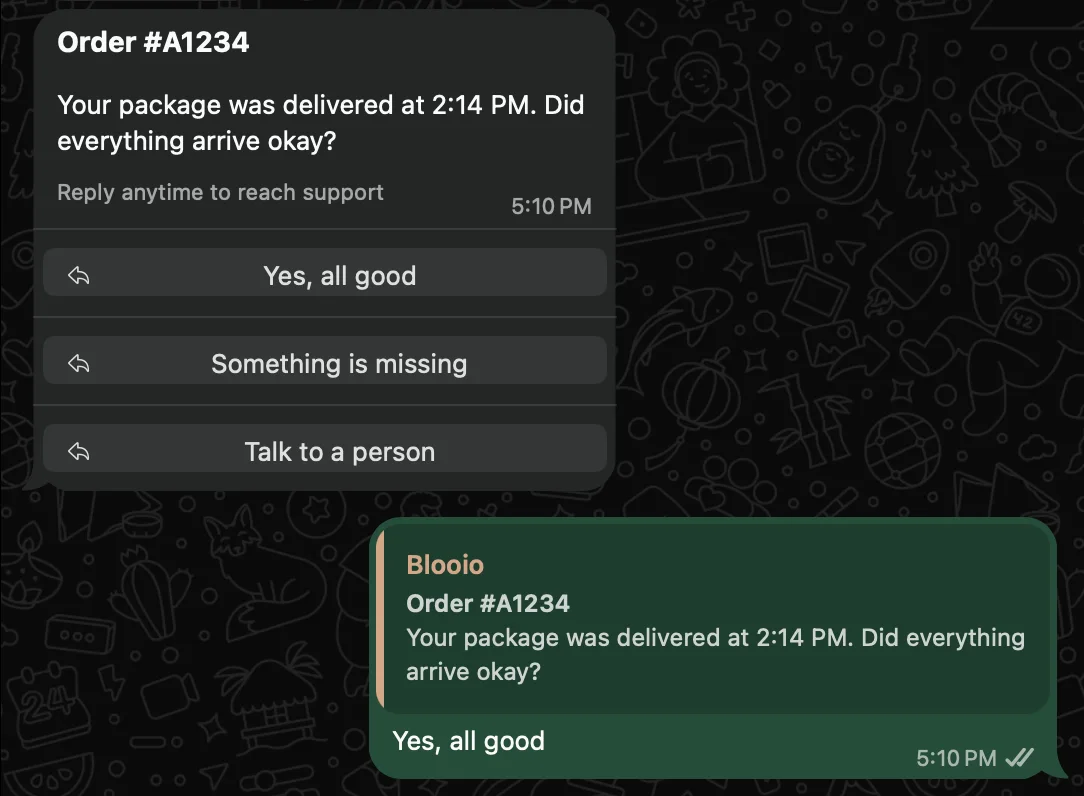
cURL
curl -X POST 'https://api.blooio.com/v4/messages' \
  -H 'Authorization: Bearer YOUR_API_KEY' \
  -H 'Content-Type: application/json' \
  -d '{
    "to": "+15551234567",
    "from": "+15559876543",
    "interactive": {
      "kind": "button",
      "header": "Order #A1234",
      "body": "Your package was delivered at 2:14 PM. Did everything arrive okay?",
      "footer": "Reply anytime to reach support",
      "buttons": [
        { "id": "ok", "title": "Yes, all good" },
        { "id": "missing", "title": "Something is missing" },
        { "id": "agent", "title": "Talk to a person" }
      ]
    }
}'Node.js
await fetch('https://api.blooio.com/v4/messages', {
  method: 'POST',
  headers: {
    'Authorization': `Bearer ${process.env.BLOOIO_API_KEY}`,
    'Content-Type': 'application/json'
  },
  body: JSON.stringify({
    to: '+15551234567',
    from: '+15559876543',
    interactive: {
      kind: 'button',
      header: 'Order #A1234',
      body: 'Your package was delivered at 2:14 PM. Did everything arrive okay?',
      footer: 'Reply anytime to reach support',
      buttons: [
        { id: 'ok', title: 'Yes, all good' },
        { id: 'missing', title: 'Something is missing' },
        { id: 'agent', title: 'Talk to a person' }
      ]
    }
  })
})
Python
requests.post('https://api.blooio.com/v4/messages',
  headers={
    'Authorization': f"Bearer {os.environ['BLOOIO_API_KEY']}",
    'Content-Type': 'application/json'
  },
  json={
    'to': '+15551234567',
    'from': '+15559876543',
    'interactive': {
      'kind': 'button',
      'header': 'Order #A1234',
      'body': 'Your package was delivered at 2:14 PM. Did everything arrive okay?',
      'footer': 'Reply anytime to reach support',
      'buttons': [
        { 'id': 'ok', 'title': 'Yes, all good' },
        { 'id': 'missing', 'title': 'Something is missing' },
        { 'id': 'agent', 'title': 'Talk to a person' }
      ]
    }
  }
)
Each button needs a title of at most 20 characters. Set an id on every button: it's what comes back when the customer taps. A button without one is numbered btn_0, btn_1, ….
Lists
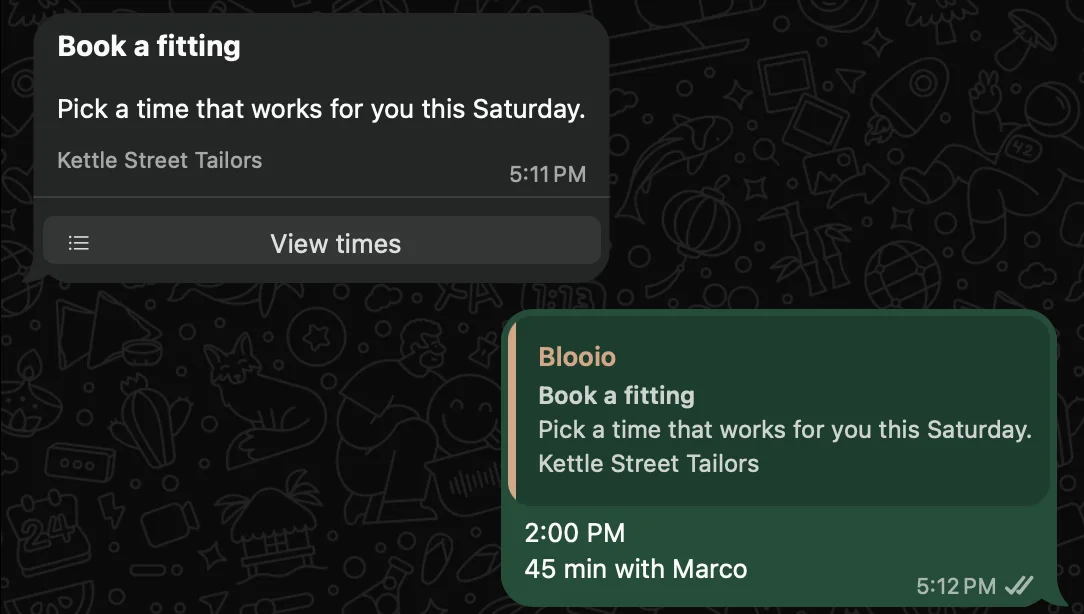
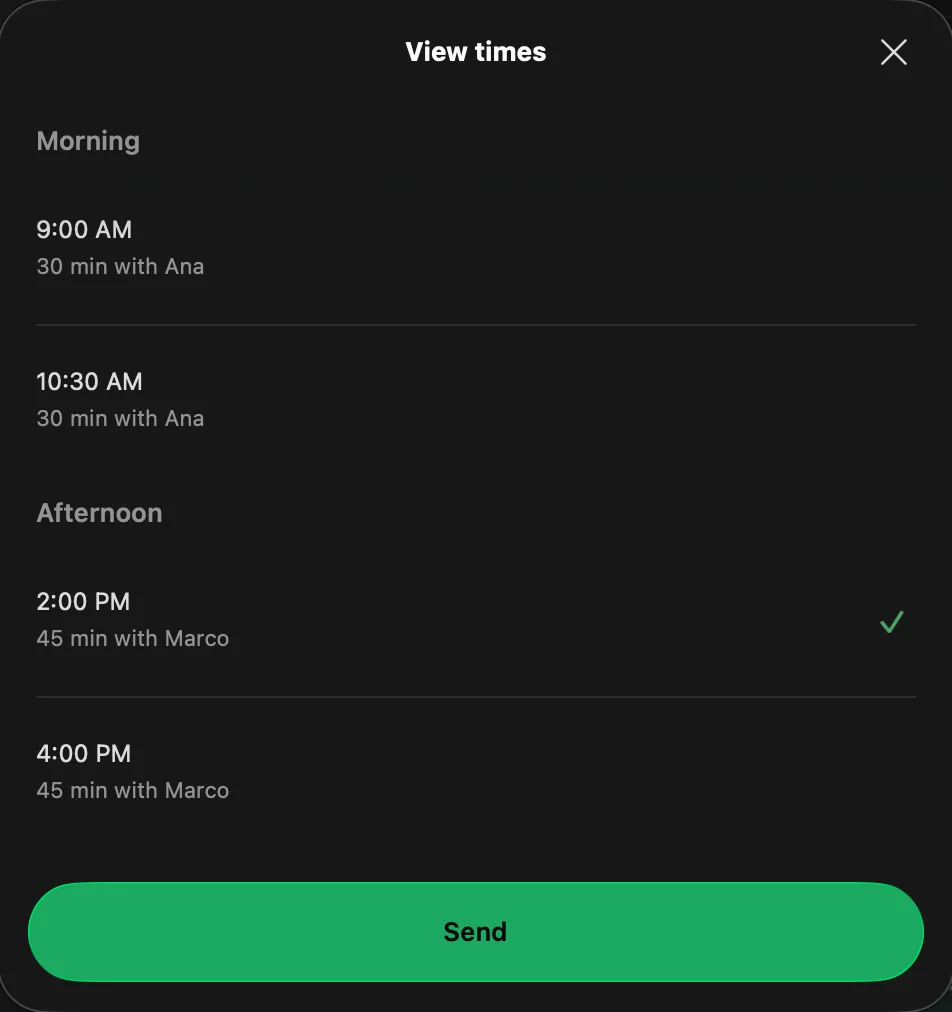
A list shows one button under the message. Tapping it opens a sheet with your rows grouped into sections, and the customer picks one and taps Send.
curl -X POST 'https://api.blooio.com/v4/messages' \
  -H 'Authorization: Bearer YOUR_API_KEY' \
  -H 'Content-Type: application/json' \
  -d '{
    "to": "+15551234567",
    "from": "+15559876543",
    "interactive": {
      "kind": "list",
      "header": "Book a fitting",
      "body": "Pick a time that works for you this Saturday.",
      "footer": "Kettle Street Tailors",
      "button": "View times",
      "sections": [
        {
          "title": "Morning",
          "rows": [
            { "id": "sat-0900", "title": "9:00 AM", "description": "30 min with Ana" },
            { "id": "sat-1030", "title": "10:30 AM", "description": "30 min with Ana" }
          ]
        },
        {
          "title": "Afternoon",
          "rows": [
            { "id": "sat-1400", "title": "2:00 PM", "description": "45 min with Marco" },
            { "id": "sat-1600", "title": "4:00 PM", "description": "45 min with Marco" }
          ]
        }
      ]
    }
}'| Field | Notes |
|---|---|
button |
The label on the button that opens the sheet. Defaults to "Menu". |
sections[].title |
Heading for a group of rows. Optional with a single section. |
sections[].rows[].id |
Comes back when the customer picks this row. Required. |
sections[].rows[].title |
The row's main line. |
sections[].rows[].description |
Optional second line under the title. |
A list holds at most 10 sections and 10 rows in total.
Link buttons
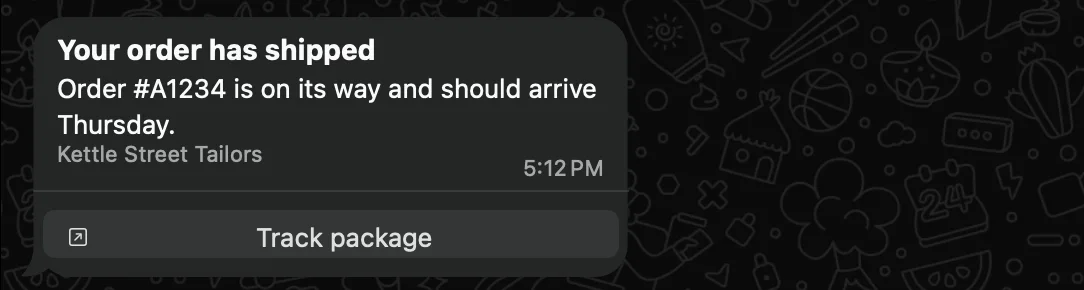
A cta_url message carries one button that opens a URL in the customer's browser.
curl -X POST 'https://api.blooio.com/v4/messages' \
  -H 'Authorization: Bearer YOUR_API_KEY' \
  -H 'Content-Type: application/json' \
  -d '{
    "to": "+15551234567",
    "from": "+15559876543",
    "interactive": {
      "kind": "cta_url",
      "header": "Your order has shipped",
      "body": "Order #A1234 is on its way and should arrive Thursday.",
      "footer": "Kettle Street Tailors",
      "display_text": "Track package",
      "url": "https://example.com/track/A1234"
    }
}'display_text is the button label (defaults to "Open"). The tap opens the link and sends nothing back to you.
Header and footer
Every kind takes an optional header and footer:
header— a string for a bold text header, or a Cloud API header object for media, such as{ "type": "image", "image": { "link": "https://example.com/banner.jpg" } }.footer— a string shown in small gray text under the body.
Meta requires a body on every kind.
When the customer taps
A tap on a reply button or a list row arrives as a message.received webhook with message_type: "interactive", the tapped title as text, and an interactive object:
{
  "type": "message.received",
  "data": {
    "message_id": "msg_01a19ef6-f18b-7bb3-b55c-a9bcd5a0216f",
    "chat_id": "chat_01a097bf-8cb6-780c-a31f-7b4c906917cf",
    "channel_type": "whatsapp_business",
    "direction": "inbound",
    "message_type": "interactive",
    "text": "2:00 PM",
    "sender": "+15551234567",
    "attachments": [],
    "interactive": {
      "kind": "list_reply",
      "role": "reply",
      "label": "List",
      "chosen": ["2:00 PM"],
      "selected": { "id": "sat-1400", "title": "2:00 PM" }
    }
  }
}
interactive.kind |
Tapped on |
|---|---|
button_reply |
A reply button |
list_reply |
A list row |
button |
A template's quick-reply button (selected.id is the button's payload) |
Branch on selected.id. It's the id you set, so it stays the same if you reword the button. The same interactive object is on the message from GET /v4/chats/{chatId}/messages/{messageId}.
app.post('/webhooks/blooio', (req, res) => {
  const { type, data } = req.body;
  if (type === 'message.received' && data.interactive?.role === 'reply') {
    switch (data.interactive.selected.id) {
      case 'missing': openReplacementCase(data.chat_id); break;
      case 'agent': handOffToAgent(data.chat_id); break;
      case 'sat-1400': bookFitting(data.contact, 'sat-1400'); break;
    }
  }
  res.sendStatus(200);
});
A tap also opens or resets the 24-hour customer service window, like any message from the customer.